프로젝트를 진행하면서, 토스 결제 연동을 맡게 되어서, 내가 할 수 있을까 불안했다.
내가 먼저 토스 결제 부분을 하고 싶다고 했었기 때문에, 무조건 해내야 하는,,, 압박감이랄까
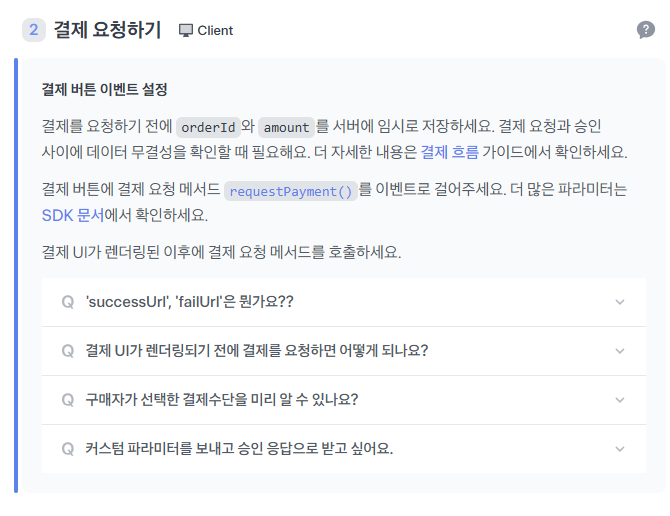
혹시나 구현하는 데에 시간이 많이 걸릴까봐, 빠르게 시작하였다.
다행히 토스 개발자센터에서 매우 자세히 깔끔하게 연동 가이드를 제시해줘서, 흐름을 이해한 후에는 빠르게 연동을 할 수 있었다.
https://developers.tosspayments.com/
항상 토스는 UX/UI도 깔끔하고,,, 가이드도 이렇게 쉽고 깔끔하게 작성해주고,, 이래서 토스인가 싶다라는 생각을 다시 한번 하게 된다.
토스(Toss) 결제 연동을 하다 보면, 다음과 같은 두 가지 API 키가 있다는 걸 알게 된다.
1. 결제위젯 연동 키
2. API 개별 연동 키
처음엔 이 차이를 이해하는 데 시간이 좀 걸렸다.
(사실 꽤 오래…)
그래서 이 글에서는 언제, 어떤 키를 써야 하는지를 정확히 정리하고, 연동까지 해보려고 한다.
1. 결제위젯 연동 키
이 키는 결제위젯을 사용할 때 필요하다.
토스가 제공하는 UI 전체를 그대로 사용할 경우
결제 방식 선택 → 결제 완료까지 UI를 위임하는 방식이다.

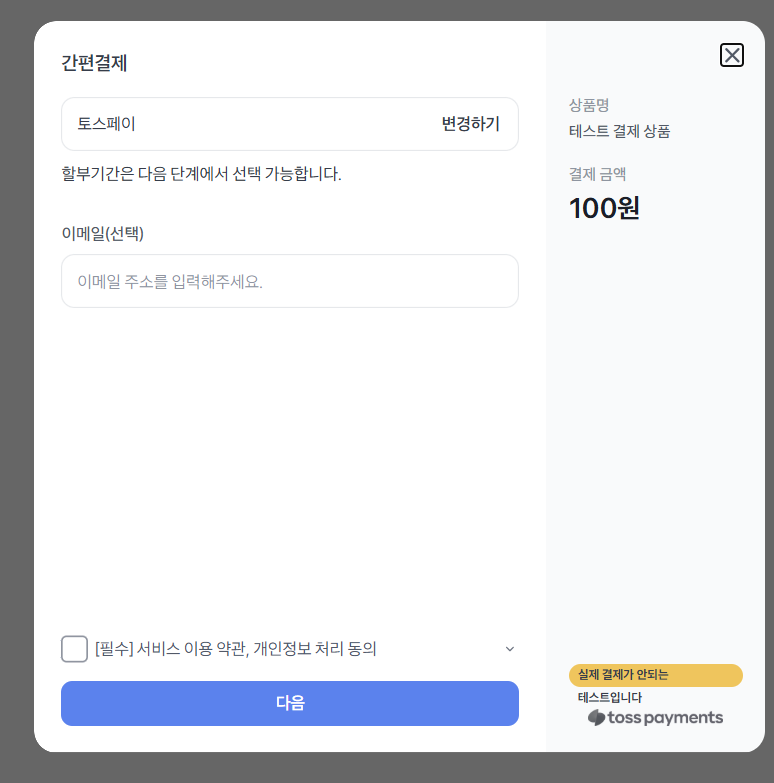
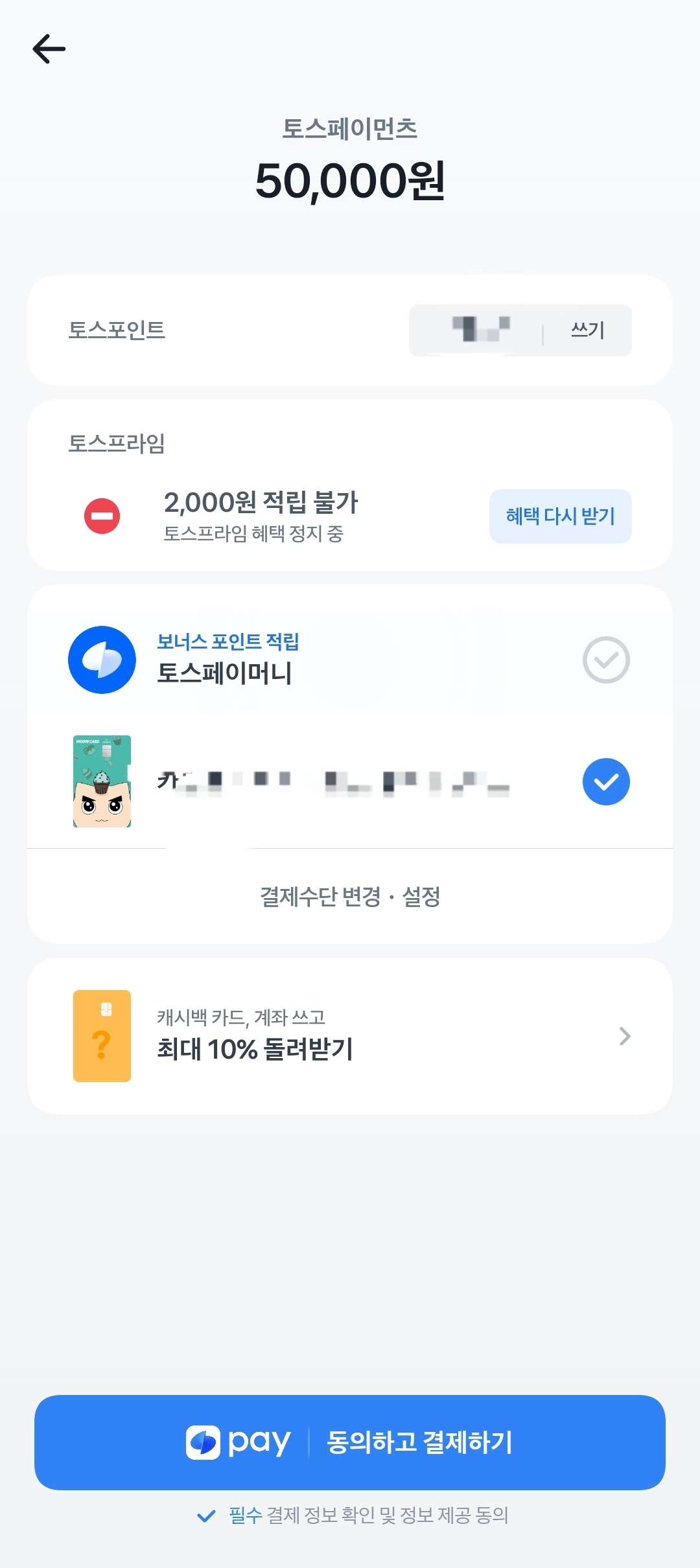
이럴 때는 결제위젯 연동 키만으로도 충분하다.
2. API 개별 연동 키
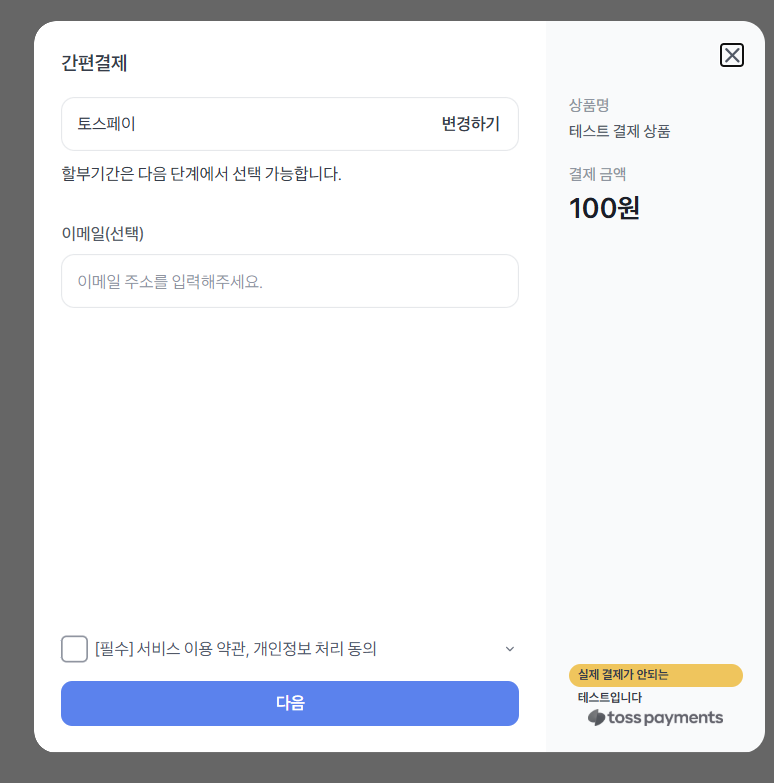
이 키는 UI는 직접 만들고,
결제 처리에만 토스 API를 사용하는 경우에 필요하다.
- 사용자가 버튼을 누른다
- 토스 API를 호출해 실제 결제를 진행한다


우리
팀의 선택은? → API 개별 연동 키
우리는 이미 다음과 같이 자체 디자인된 UI와 결제하기 버튼이 존재한다.
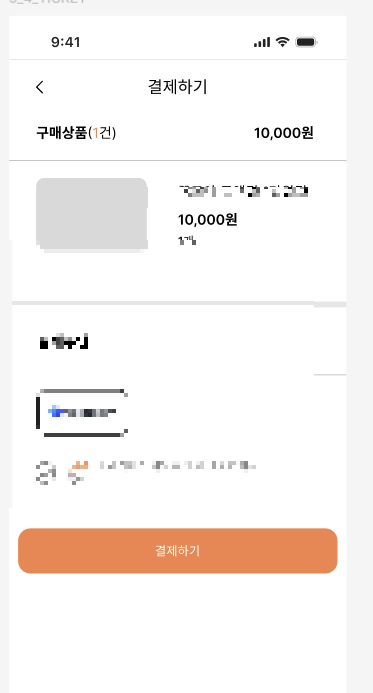
- 결제 방식 선택 화면은 우리가 구성하고
- 결제창부터 토스 API를 연동한다
결제위젯은 쓰지 않고 API만 직접 사용하기에 API 개별 연동 키를 사용하기로 결정했다.
사용 흐름 요약 정리
| 상황 | 사용하는 키 |
|---|---|
| 토스 UI 전체 사용 (결제위젯) | 결제위젯 연동 키 |
| 자체 UI + 토스 API만 사용 | API 개별 연동 키 |
2. 전체 결제 플로우
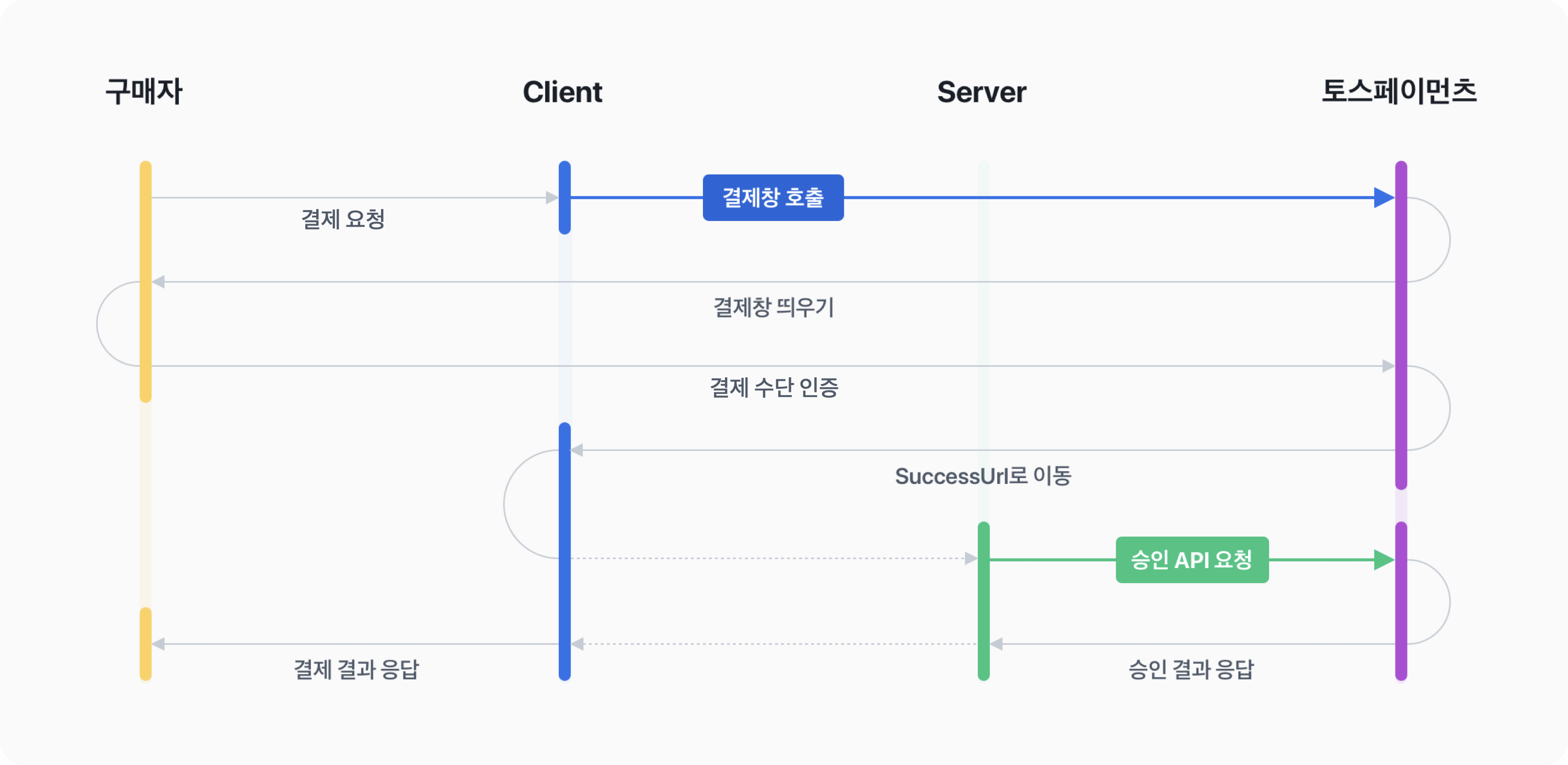
결제창부터 시작되는 플로우는 아래와 같다.
A. 클라이언트와 토스의 흐름

- 구매자가 클라이언트에 결제 요청, 즉 결제하기 버튼을 누른다.
- 클라이언트는 토스에게 결제창을 요청한다.
- 토스는 결제창을 클라이언트(구매자)에게 띄워준다.
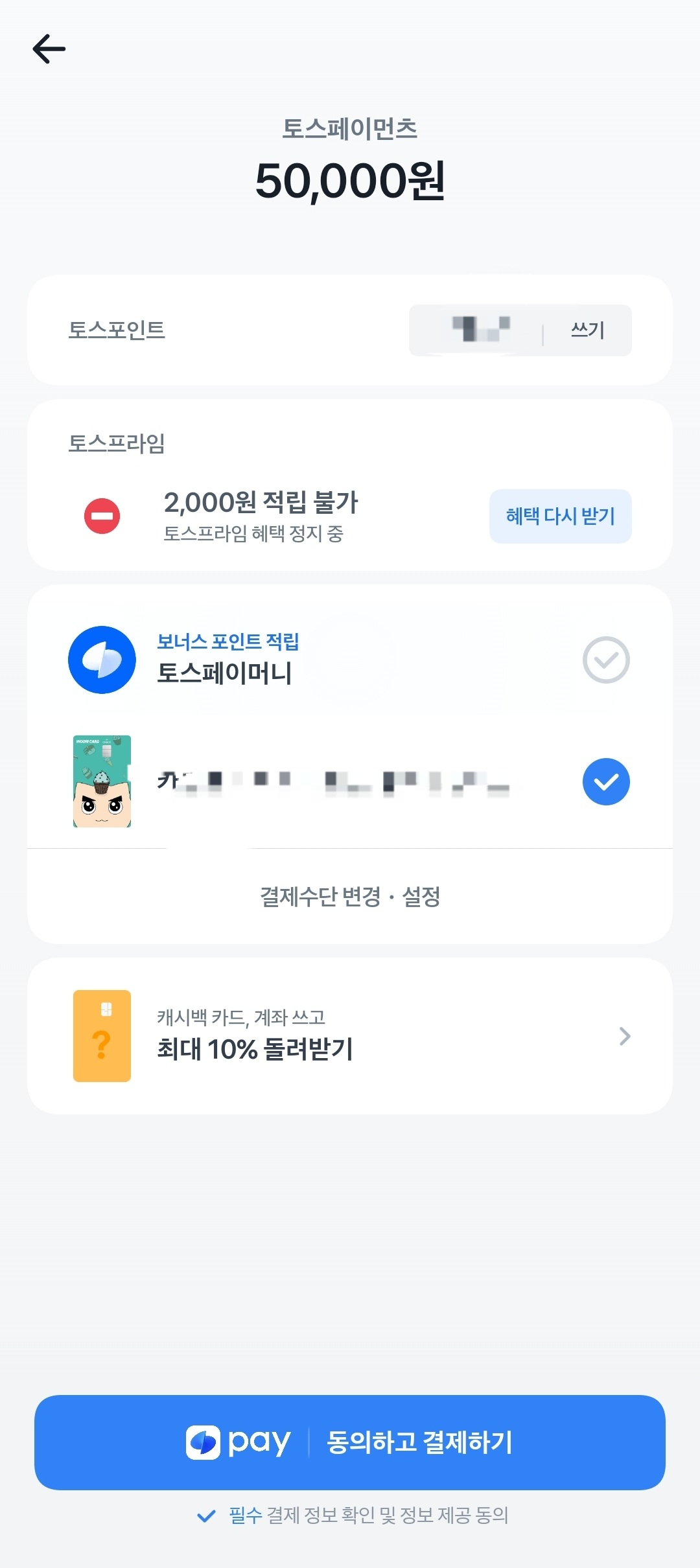
이때 결제 수단을 선택하고 인증이 완료되면, SuccessUrl로 리다이렉트된다.
여기까지가 위 이미지의 흐름이다. 즉 서버와 통신하기 직전 단계다.
B. 서버와 토스 그리고 클라이언트
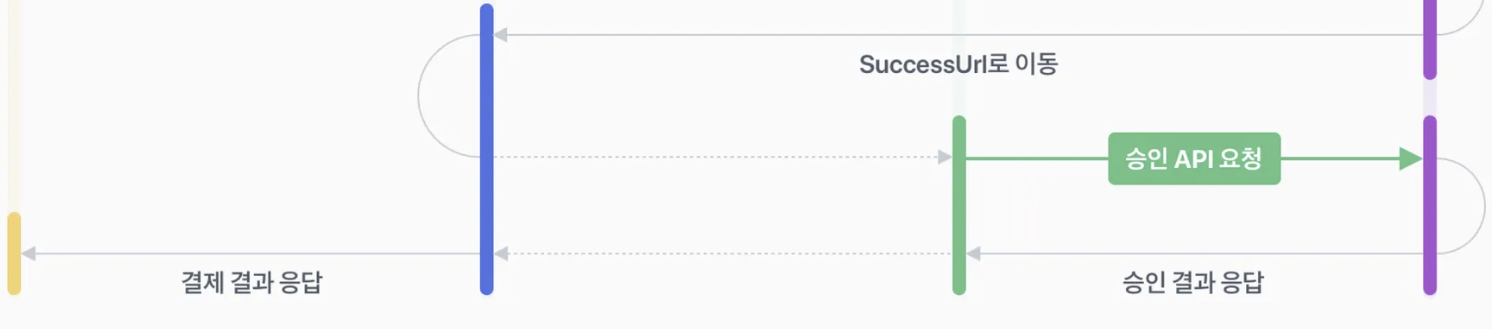
리다이렉트된 SuccessUrl에는 다음과 같은 쿼리 파라미터가 붙는다:
/success?orderId={ORDER_ID}&paymentKey={PAYMENT_KEY}&amount={AMOUNT}이 중 paymentKey는 토스에서 발급하는 고유 결제 키로,
결제 승인/취소/조회 API 호출에 반드시 필요하므로 DB에 저장해야 한다.
이후 서버에서는 이 데이터를 기반으로 결제 승인 API를 호출하게 된다.
Payment 엔티티 설계
아래는 위 흐름에 맞게 구현한 결제 API이다.
토스의 API를 통해 제공되는 payment객체는
결제 정보를 담고 있는 객체이다. 결제 한 건의 결제 상태, 결제 취소 기록, 매출 전표, 현금영수증 정보 등을 자세히 알 수 있습니다.
결제가 승인됐을 때 응답은 Payment 객체로 항상 동일하다. 객체의 구성은 결제수단(카드, 가상계좌, 간편결제 등)에 따라 조금씩 달라진다.
Payment가 가지고 있는 정보는 아래의 스크린샷보다 더 많은 정보를 담고 있다.
상세한 정보는 아래에서 확인하면 된다.
토스의 결제 승인 응답에서 필요한 필드만 추려서 아래와 같이 저장하도록 설계했다.
@Entity
@Getter
@NoArgsConstructor(access = AccessLevel.PROTECTED)
@AllArgsConstructor
@Builder
public class Payment extends BaseEntity {

    @Id @GeneratedValue private UUID id;

    @Column(nullable = false, unique = true, length = 200)
    private String orderId;

    @Column(nullable = false, length = 200)
    private String paymentKey;

    @Column(nullable = false)
    private String orderName;

    @Column(nullable = false)
    private int amount;

    private String method;

    @Enumerated(EnumType.STRING)
    private PaymentStatus status;

    private LocalDateTime approvedAt;

    @ManyToOne(fetch = FetchType.LAZY)
    @JoinColumn(name = "user_id")
    private User user;

    public void updateFromTossResponse(TossPaymentConfirmResponseDto res) {
        this.paymentKey = res.getPaymentKey();
        this.method = res.getMethod();
        this.amount = res.getTotalAmount();
        this.approvedAt = LocalDateTime.parse(res.getApprovedAt());
        this.status = PaymentStatus.SUCCESS;
    }
}
Payment DTO 정의
// 결제 준비 요청 DTO
public static class PaymentPrepareRequestDto {
    private String orderId;
    private String orderName;
    private int amount;
}

// 결제 승인 요청 DTO
public static class PaymentConfirmRequestDto {
    private String paymentKey;
    private String orderId;
    private int amount;
}
1. PaymentPrepareResponseDto
import java.io.Serializable;

public record PaymentPrepareResponseDto(String orderId, String orderName, int amount)
implements Serializable {}record를 사용한 이유는 다음과 같다:
- Redis에 임시로 저장되며
- 만료 시간이 지나면 자동 삭제되기 때문
- 작고 단순하며 불변한 객체에
record가 적합하다고 생각
2. TossPaymentConfirmResponseDto
import lombok.Getter;

@Getter
public class TossPaymentConfirmResponseDto {
    private String orderId;
    private String paymentKey;
    private String orderName;
    private int totalAmount;
    private String method;
    private String approvedAt;
}TossPaymentConfirmResponseDto는 토스 결제 승인 API 응답의 주요 정보를 담고 있다.
결제 방법, 승인 시각, 금액 등 클라이언트와 서버에서 필요로 하는 필수 데이터가 포함된다.
PaymentConverter
@RequiredArgsConstructor
@Component
public class PaymentConverter {
    public static Payment toEntity(
            PaymentRequestDto.PaymentPrepareRequestDto requestDto, User user) {
        return Payment.builder()
                .orderId(requestDto.getOrderId())
                .orderName(requestDto.getOrderName())
                .amount(requestDto.getAmount())
                .status(PaymentStatus.PENDING)
                .user(user)
                .build();
    }
}
결제 준비 정보 Redis 저장
결제하기 버튼을 누르면 서버에 임시로 정보를 저장해야 한다. 이때 DB 대신 Redis에 10분간 캐시하는 전략을 사용했다.
Redis 저장소 구현
@Repository
public class RedisPaymentPrepareRepository {

    private final RedisTemplate<String, PaymentRequestDto.PaymentPrepareRequestDto> redisTemplate;
    private final ObjectMapper objectMapper;
    private static final String PREFIX = "PAYMENT:";

    public void save(PaymentRequestDto.PaymentPrepareRequestDto request) {
        redisTemplate.opsForValue()
            .set(PREFIX + request.getOrderId(), request, Duration.ofMinutes(10));
    }

    public Optional<PaymentRequestDto.PaymentPrepareRequestDto> findByOrderId(String orderId) {
        Object raw = redisTemplate.opsForValue().get(PREFIX + orderId);
        if (raw == null) return Optional.empty();
        return Optional.of(objectMapper.convertValue(raw, PaymentRequestDto.PaymentPrepareRequestDto.class));
    }

    public void delete(String orderId) {
        redisTemplate.delete(PREFIX + orderId);
    }
}
결제 승인 confirm() 메서드 구현
결제 금액 불일치 확인 → 토스 API 호출 → 사용자 정보 저장의 흐름이다.
public Payment confirm(PaymentRequestDto.PaymentConfirmRequestDto req) {
    PaymentPrepareRequestDto prepare = redisRepository.findByOrderId(req.getOrderId())
        .orElseThrow(() -> new PaymentHandler(ErrorStatus.PAYMENT_INFO_NOT_FOUND));

    if (req.getAmount() != prepare.getAmount()) {
        throw new PaymentHandler(ErrorStatus.PAYMENT_AMOUNT_MISMATCH);
    }

    HttpHeaders headers = new HttpHeaders();
    headers.setContentType(MediaType.APPLICATION_JSON);
    headers.set("Authorization", "Basic " + Base64.getEncoder()
        .encodeToString((secretKey + ":").getBytes(StandardCharsets.UTF_8)));

    Map<String, Object> body = Map.of(
        "paymentKey", req.getPaymentKey(),
        "orderId", req.getOrderId(),
        "amount", req.getAmount()
    );

    ResponseEntity<TossPaymentConfirmResponseDto> response =
        restTemplate.postForEntity("https://api.tosspayments.com/v1/payments/confirm",
                                   new HttpEntity<>(body, headers),
                                   TossPaymentConfirmResponseDto.class);

    TossPaymentConfirmResponseDto res = response.getBody();
    if (res == null) {
        log.error("Toss 응답 null: {}", req);
        throw new PaymentHandler(ErrorStatus.PAYMENT_CONFIRM_RESPONSE_NULL);
    }

    User user = authService.getCurrentUser();
    Payment payment = PaymentConverter.toEntity(prepare, user);
    payment.updateFromTossResponse(res);

    return paymentRepository.save(payment);
}
PaymentCommandService 전체 구현
@Slf4j
@RequiredArgsConstructor
@Service
public class PaymentCommandService {

    private final RedisPaymentPrepareRepository redisRepository;
    private final PaymentRepository paymentRepository;
    private final RestTemplate restTemplate;
    private final AuthService authService;

    @Value("${toss.secret-key}")
    private String secretKey;

    // 결제 준비 단계 (임시 저장)

    public PaymentPrepareResponseDto prepare(PaymentRequestDto.PaymentPrepareRequestDto request) {
        String orderId = request.getOrderId() != null
            ? request.getOrderId()
            : UUID.randomUUID().toString().replace("-", "").substring(0, 20);

        PaymentPrepareRequestDto saveDto = PaymentPrepareRequestDto.of(
            orderId, request.getOrderName(), request.getAmount());

        redisRepository.save(saveDto);

        return new PaymentPrepareResponseDto(
            saveDto.getOrderId(), saveDto.getOrderName(), saveDto.getAmount());
    }

    // 결제 승인 단계
    public Payment confirm(PaymentRequestDto.PaymentConfirmRequestDto req) {
        PaymentPrepareRequestDto prepare = redisRepository.findByOrderId(req.getOrderId())
            .orElseThrow(() -> new PaymentHandler(ErrorStatus.PAYMENT_INFO_NOT_FOUND));

        if (req.getAmount() != prepare.getAmount()) {
            throw new PaymentHandler(ErrorStatus.PAYMENT_AMOUNT_MISMATCH);
        }

        HttpHeaders headers = new HttpHeaders();
        headers.setContentType(MediaType.APPLICATION_JSON);
        String encodedKey = Base64.getEncoder()
            .encodeToString((secretKey + ":").getBytes(StandardCharsets.UTF_8));
        headers.set("Authorization", "Basic " + encodedKey);

        Map<String, Object> body = Map.of(
            "paymentKey", req.getPaymentKey(),
            "orderId", req.getOrderId(),
            "amount", req.getAmount());

        HttpEntity<?> entity = new HttpEntity<>(body, headers);

        ResponseEntity<TossPaymentConfirmResponseDto> response = restTemplate.postForEntity(
            "https://api.tosspayments.com/v1/payments/confirm",
            entity,
            TossPaymentConfirmResponseDto.class);

        TossPaymentConfirmResponseDto res = response.getBody();
        if (res == null) {
            log.error("Toss 응답 null: {}", req);
            throw new PaymentHandler(ErrorStatus.PAYMENT_CONFIRM_RESPONSE_NULL);
        }

        User user = authService.getCurrentUser();
        Payment payment = PaymentConverter.toEntity(prepare, user);
        payment.updateFromTossResponse(res);

        return paymentRepository.save(payment);
    }
}
부분 설명 - prepare
String orderId =
    request.getOrderId() != null
        ? request.getOrderId()
        : UUID.randomUUID().toString().replace("-", "").substring(0, 20);
✔️ orderId는 필수값이기 때문에, 클라이언트에서 안 보낼 경우 랜덤으로 생성한다.
UUID를 짧게 자른 형태로 생성하는 이유는 토스의 orderId 제한에 맞추기 위함이다.
PaymentRequestDto.PaymentPrepareRequestDto saveDto =
    PaymentRequestDto.PaymentPrepareRequestDto.of(
        orderId, request.getOrderName(), request.getAmount());
redisRepository.save(saveDto);
부분 설명 - confirm
결제 승인 시, 시크릿 키 설정은 반드시 필요
confirm() 메서드는 토스의 결제 승인 API를 호출하는 핵심 단계다.
이때 Authorization 헤더에 시크릿 키(secretKey)가 반드시 포함되어야 한다.
토스 서버는 이 키를 통해 “이 요청이 인증된 서버에서 왔는지”를 확인한다.
더 자세한 설명은 아래 링크에서 확인하면 된다.
https://docs.tosspayments.com/reference/using-api/authorization
// Authorization 헤더 설정
HttpHeaders headers = new HttpHeaders();
headers.setContentType(MediaType.APPLICATION_JSON);

String encodedKey = Base64.getEncoder()
    .encodeToString((secretKey + ":").getBytes(StandardCharsets.UTF_8));

headers.set("Authorization", "Basic " + encodedKey);
✔️ 핵심 포인트:
secretKey + ":"형태로 인코딩해야 한다.- 이 인코딩 값을
Authorization: Basic {encodedKey}형식으로 헤더에 넣는다. - 키가 잘못되면
401 Unauthorized또는403 Forbidden오류가 발생한다.
환경 설정에서 안전하게 주입
@Value("${toss.secret-key}")
private String secretKey;
- 시크릿 키는 절대로 클라이언트(HTML, JS) 코드에 노출되면 안 된다.
반드시 백엔드에서만 관리하고, 설정 파일을 통해 안전하게 주입해야 한다. - 생성된 정보는 Redis에 저장된다.
기본 만료 시간은 10분으로 설정되어 있으며, 이후 자동 삭제된다.
Redis 설정 코드
@Configuration
public class RedisConfig {

    @Bean
    public RedisTemplate<String, Object> redisTemplate(RedisConnectionFactory factory) {
        RedisTemplate<String, Object> template = new RedisTemplate<>();
        template.setConnectionFactory(factory);
        template.setKeySerializer(new StringRedisSerializer());
        template.setValueSerializer(new GenericJackson2JsonRedisSerializer());
        return template;
    }

    @Bean
    public RedisTemplate<String, PaymentRequestDto.PaymentPrepareRequestDto>
            paymentPrepareRedisTemplate(RedisConnectionFactory factory, ObjectMapper objectMapper) {

        RedisTemplate<String, PaymentRequestDto.PaymentPrepareRequestDto> template =
                new RedisTemplate<>();
        template.setConnectionFactory(factory);
        template.setKeySerializer(new StringRedisSerializer());
        template.setValueSerializer(new GenericJackson2JsonRedisSerializer(objectMapper));
        return template;
    }
}
결제 성공 !!

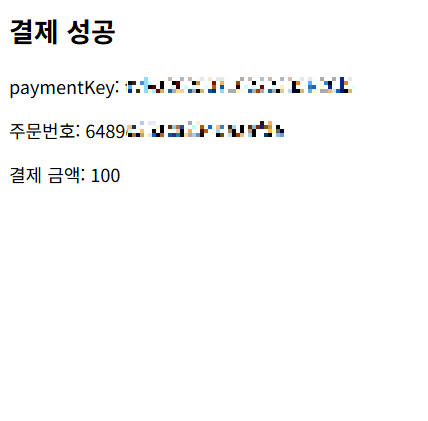
/confirm 메소드로 들어가는 값들

/success 에 해당 값들이 파라미터로 잘 들어가는 것을 확인할 수 있다.

토스 개발자센터에 있는 API 로그에서도 결제 성공 여부를 확인할 수 있다.

테스트용 HTML 연동 (토스 결제 프론트/백엔드 직접 연동해보기)
https://docs.tosspayments.com/guides/v2/payment-window/integration
토스 결제 API를 테스트해보기 위해 HTML 파일로 직접 연동을 시도해봤다.
HTML은 친절하게도 토스에서 제공해준다.(물론, 서버 파일도!!)
클라이언트 SDK와 서버 API를 연결한 간단한 구조로 동작한다.
Billing.html
결제하기 버튼을 눌렀을 때, 서버에 사전 결제정보를 저장하고,
토스 결제창을 호출하는 흐름이다.
<script src="https://js.tosspayments.com/v1/payment"></script>

<button id="pay-button">결제하기</button>

<script>
const clientKey = "test_ck"; // 본인의 클라이언트 키 사용
const tossPayments = TossPayments(clientKey);

document.getElementById("pay-button").addEventListener("click", async () => {
  try {
    const prepareRes = await fetch("http://localhost:8080/v1/payments/prepare", {
      method: "POST",
      headers: { "Content-Type": "application/json" },
      body: JSON.stringify({
        orderName: "테스트 결제 상품",
        amount: 100
      }),
    });

    const prepareData = await prepareRes.json();

    await tossPayments.requestPayment("카드", {
      amount: prepareData.amount,
      orderId: prepareData.orderId,
      orderName: prepareData.orderName,
      customerName: "김토스",
      successUrl: window.location.origin + "/success.html",
      failUrl: window.location.origin + "/fail.html"
    });
  } catch (error) {
    if (error.code === "USER_CANCEL") {
      alert("사용자가 결제를 취소했습니다.");
    } else {
      alert("결제 오류: " + error.message);
    }
  }
});
</script>
success.html
결제 성공 시 리다이렉트 되는 페이지.
쿼리 파라미터에 담긴 orderId, paymentKey, amount를 서버에 전달하여 결제 확정 API를 호출한다.
<script>
const urlParams = new URLSearchParams(window.location.search);

const paymentKey = urlParams.get("paymentKey");
const orderId = urlParams.get("orderId");
const amount = urlParams.get("amount");

async function confirm() {
  const requestData = { paymentKey, orderId, amount };

  const response = await fetch("http://localhost:8080/v1/payments/confirm", {
    method: "POST",
    headers: {
      "Content-Type": "application/json",
      "Authorization": "Bearer {jwt토큰}"
    },
    body: JSON.stringify(requestData),
  });

  const json = await response.json();

  if (!response.ok) {
    alert(`결제 확인 실패: ${json.message || '서버 오류'}`);
    window.location.href = `/fail?message=${json.message}&code=${json.code}`;
  }

  console.log("결제 성공:", json);
}

confirm();
</script>
fail.html
결제 실패 시 리다이렉트되는 페이지로, 쿼리 파라미터로 전달된 오류 메시지를 출력한다.
<script>
const urlParams = new URLSearchParams(window.location.search);

document.getElementById("code").textContent =
  "에러코드: " + urlParams.get("code");

document.getElementById("message").textContent =
  "실패 사유: " + urlParams.get("message");
</script>
트러블슈팅: 403 Forbidden
결제는 성공했는데, success.html에서 결제 확인 API 호출 시 403 오류가 발생했다.
POST http://localhost:8080/v1/payments/confirm 403 (Forbidden)
원인은 스프링 시큐리티(Spring Security)에 의해 차단되었기 때문이었다.
JWT 토큰을 요청 헤더에 넣지 않으면 인증 실패로 인해 접근이 거부된다.
테스트 중이라면 프론트 코드에 임시 토큰을 넣어두는 것도 방법이다.
headers: {
  "Content-Type": "application/json",
  "Authorization": "Bearer {임시 토큰}"
}
이걸 모르고 한참을 왜 자꾸 fail.html 가는지 혼자 헤맸다… 역시 로그는 꼭 봐야 하고, 스프링시큐리티는 테스트할 때도 꼭 신경 써야 한다는 걸 다시 느낌.
정리
- 결제 버튼 클릭 → Redis에 orderId, orderName, amount 저장
- 결제 완료 후 리다이렉트 SuccessUrl에서 orderId, paymentKey, amount 추출
- 서버가 Toss 결제 승인 API 호출
- 응답으로 받은 정보와 사용자 정보를 Payment 엔티티로 저장
임시 저장은 Redis로 처리하고, 영구 저장은 DB에만 저장하는 구조로 정리함.
이 구조는 불필요한 DB write를 줄이고, 일회성 결제 정보 처리에 매우 적합하다.
이제 이 플로우를 그대로 따라가면 토스 결제 연동은 깔끔하게 마무리된다.
마무리하며
토스 결제를 직접 연동해보면서 느낀 건 하나였다.
“이 정도로 UX/UI 깔끔하고, 가이드까지 이렇게 쉬운 결제 API가 또 있을까?”
결제창 UI는 사용자의 신뢰를 얻을 만큼 단순하고 세련됐고,
개발자 가이드는 예제부터 실무 고려사항까지 진짜 ‘실용적’으로 잘 정리돼 있었다.
SDK와 API도 레거시 없이 잘 관리되고 있고,
전체 연동 흐름도 명확해서 프론트/백엔드 모두 부담 없이 연동할 수 있다는 게 가장 큰 장점이었다.
결제 연동을 해보면서, ‘깔끔한 사용자 경험’이란 건 개발자 경험까지 설계되어야 완성된다는 걸 새삼 느꼈다.
이래서 다들 토스, 토스 하는구나 싶었다.
나도 토스 개발자,,,,하고 싶다ㅜㅜ
'SpringBoot' 카테고리의 다른 글
| [SpringBoot] AOP 기반 로깅 시스템 구현하기 - 로그와 비즈니스 로직 트랜잭션은 분리되지만 예외는 공유된다. (0) | 2025.10.14 |
|---|---|
| [SpringBoot] JPA / Hibernate / Spring Data JPA (0) | 2025.10.13 |
| [SpringBoot] AOP 기반 로깅 시스템 구축하기 (0) | 2025.09.29 |
| [SpringBoot] 금액권을 Toss 토스 결제 후, QR코드로 생성하기 (0) | 2025.09.01 |
| [트러블 슈팅]FastAPI+Spring Boot EC2+Docker+Nginx (3) | 2025.07.21 |